FundFacts now works inside Claude and ChatGPT
The FundFacts MCP server brings fund and ETF data into Claude and ChatGPT: ask in plain language, get cards with fees, risk and holdings. On every plan.Published 1 October 2026 · 5 min read · by FundFacts APIFundFacts now works inside Claude and ChatGPT. The FundFacts MCP server at https://fundfactsapi.com/api/mcp gives either assistant seven read-only tools over the same fund, ETF and SCPI data as the REST API, and the answers come back as interactive cards: fees, risk indicator, holdings, exposure and returns, each with its as-of date. You add one URL, sign in with your FundFacts account, and ask in plain language. It works on every FundFacts plan, the Free plan included.
What changed
Getting fund data into a conversation used to mean pasting a factsheet PDF or trusting what the model remembered about a fund. The MCP server replaces both. When you ask about a fund, the assistant calls a FundFacts tool, gets the structured factsheet the API would return, and answers from it. The figures are read from the documents each fund house publishes (product page, monthly factsheet, KID), refreshed at most every 24 hours, and every answer can quote the date they refer to.
In Claude (web and desktop) and in ChatGPT, the tool results render as interactive cards (MCP Apps) next to the assistant's reply, so you see the fund's figures laid out rather than a paragraph about them. Claude Code shows the same results as text.
The server also exposes an MCP prompt, tour ("Tour of FundFacts"): choose it where your client lists MCP prompts and the assistant explains what the service can do and shows a live fund.
What you can ask
Anything you would look up on a factsheet, by fund name or ISIN:
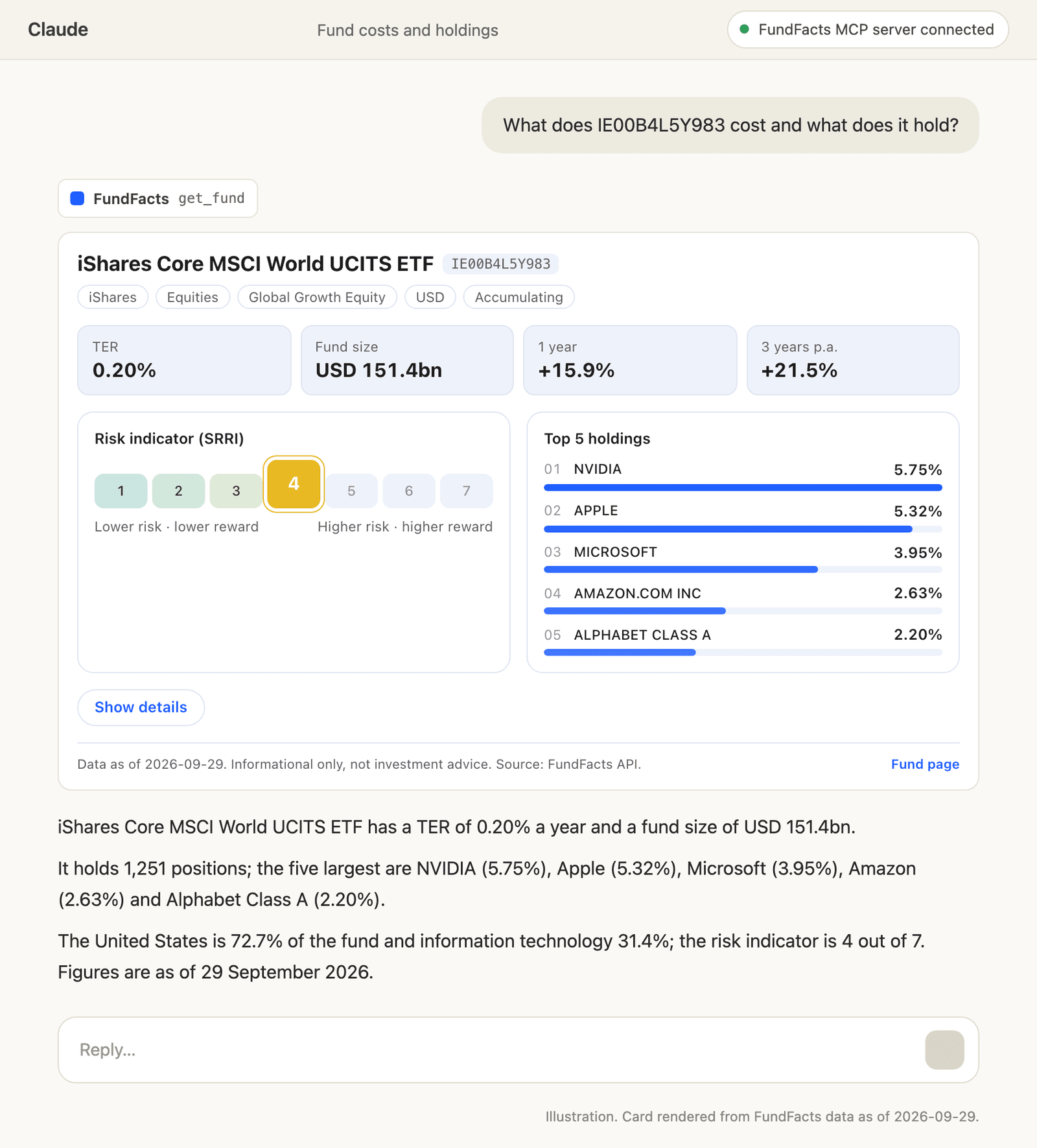
- "What does IE00B4L5Y983 cost, what does it hold and how risky is it?" calls
get_fund: TER, risk indicator from 1 to 7, top holdings, sector and country weights, returns against the benchmark. - "Find the accumulating share class of a core MSCI World ETF." calls
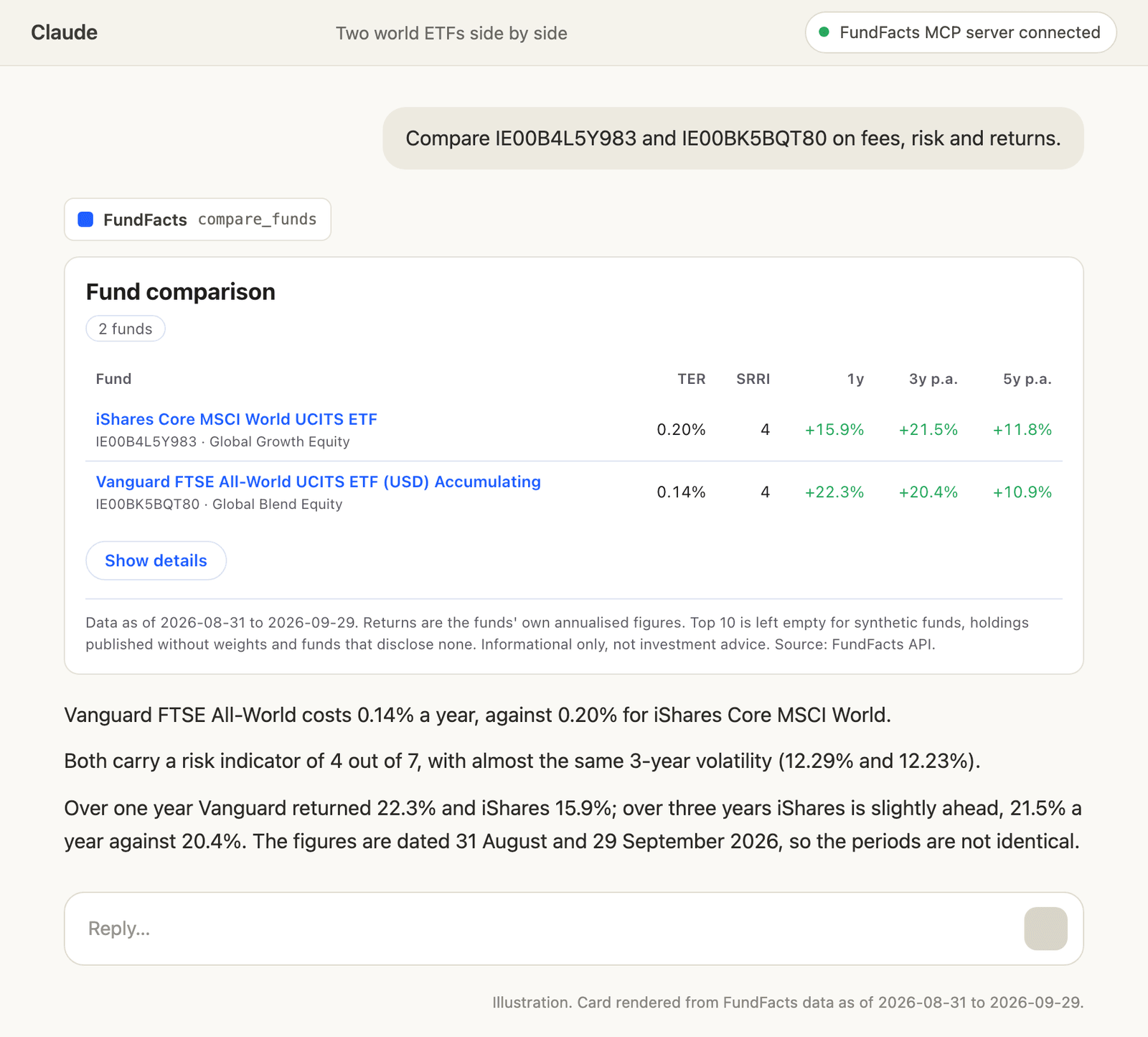
search_fundsand returns matching ISINs. - "Compare IE00B4L5Y983, IE00B3RBWM25 and LU1681043599 on fees, risk and 3-year returns." calls
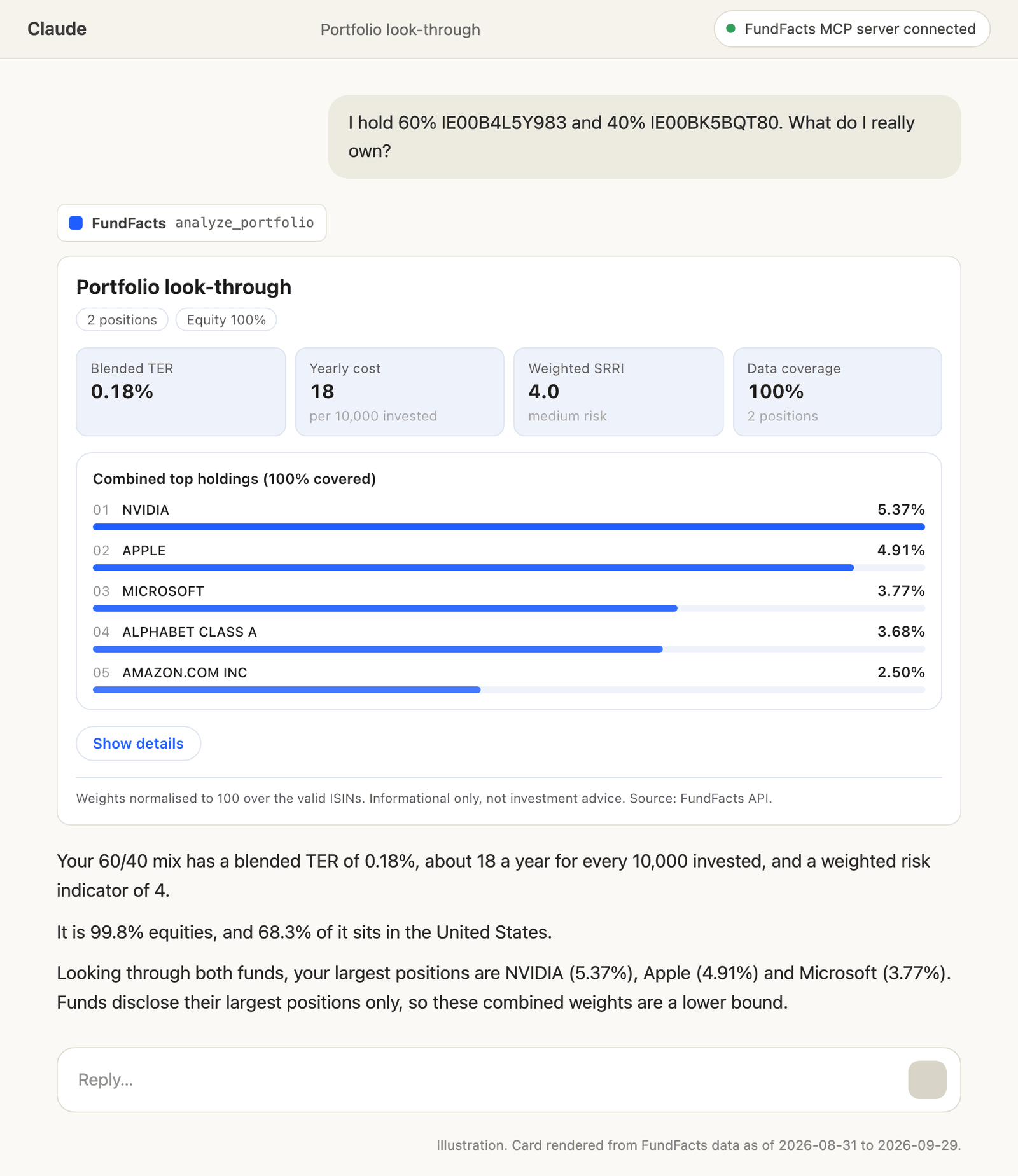
compare_funds: one table with TER, risk, fund size, 1, 3 and 5-year returns, volatility, Sharpe ratio and maximum drawdown. - "I hold 60% IE00B4L5Y983, 30% IE00B3RBWM25 and 10% LU1681043599: what is my sector and country exposure and my blended TER?" calls
analyze_portfolio. - "How much do IE00B4L5Y983 and IE00B3RBWM25 overlap?" calls
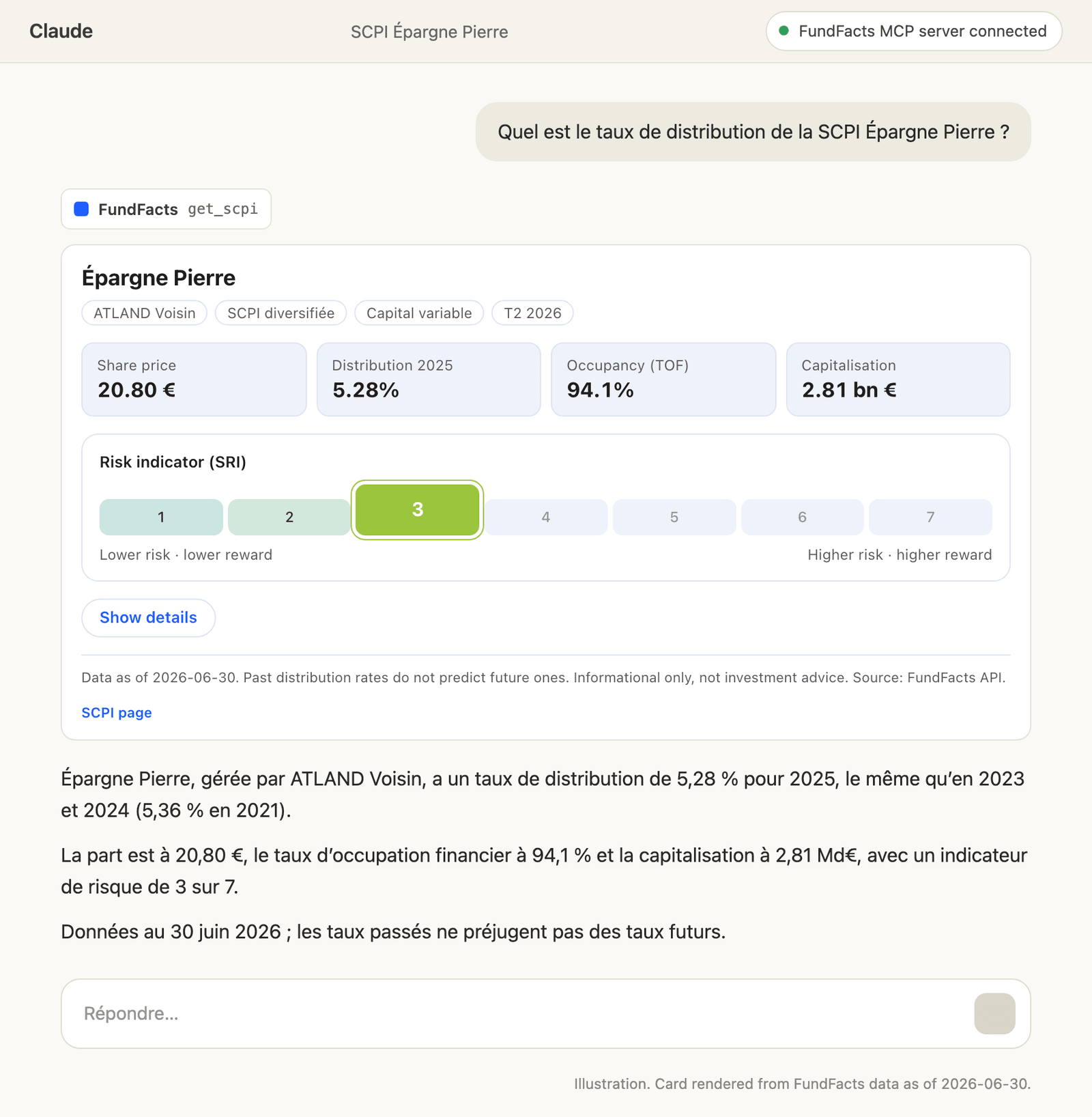
fund_overlap: the shared weight and the positions behind it. - "Summarise the distribution rate history, share price and occupancy of the SCPI Perial O2." calls
search_scpiandget_scpifor French real-estate funds.
The tools return data, not recommendations, and their descriptions ask the assistant to describe rather than advise. The data is informational and is not investment advice.
The cards
Each tool has its own card. These are illustrations of how they look in Claude.
How to connect
Claude (web and desktop)
- Open Customize → Connectors → Add custom connector.
- Enter a name and the URL
https://fundfactsapi.com/api/mcp, then click Connect. - Sign in with your FundFacts account and approve.
On Team and Enterprise plans an Owner adds the connector under Organization settings → Connectors. The Free Claude plan allows one custom connector. Signing in with your FundFacts account also works in Cowork.
ChatGPT
Custom MCP servers need developer mode, available on Plus, Pro, Business, Enterprise and Edu, on the web.
- Turn on Settings → Security and login → Developer mode.
- Open Plugins (chatgpt.com/plugins) and click +.
- Enter a name and
https://fundfactsapi.com/api/mcp, set Authentication to OAuth and click Create. - Sign in with your FundFacts account.
Claude Code
One command, then /mcp in a session to sign in:
bash
Or install the FundFacts plugin from its public repository, github.com/fundfactsapi/fundfacts-plugin. It adds the server and four skills that tell Claude Code how to read the fund data:
text
Cursor, VS Code, Windsurf, Codex and scripts
Use the same URL with an API key from your dashboard as a header: Authorization: Bearer ffk_.... The MCP docs have the configuration for each client.
What it costs
The MCP server is included in every FundFacts plan, Free included, and draws on the same monthly requests as the REST API:
- Each fund found counts as one request (an ISIN with no data is free): a
get_fundcall is one, a comparison of three funds is three. - Searches (
search_funds,search_scpi) are not counted, and neither is the example fund IE00B4L5Y983. - The portfolio look-through and overlap tools are not included in every plan: they come with Pro ($49 a month) and above. Requests & rate limits and pricing list what each plan includes.
The Free plan's 15 lookups a month are enough to try the fund card and a comparison on your own funds, with no credit card required.
Privacy and control
FundFacts receives the tool calls the assistant makes, such as the ISINs it asks about, and answers them; your conversation stays with Claude or ChatGPT under their own privacy policies. Each call is logged with your account, the connection and the ISIN or SCPI returned, so it can be counted against your plan; search terms and portfolio weights are not stored in that log. Every app you connect appears under Connected apps in the dashboard, where you can disconnect it at once. The privacy policy has the details.
Start
Create a free account, add the URL to Claude or ChatGPT, and ask about a fund you hold. The MCP server docs cover every client, the tools and their inputs. Claude and ChatGPT are trademarks of Anthropic and OpenAI.
FAQ
Is the FundFacts MCP server free?
It is included in every plan, the Free plan too. Tool calls use the same monthly requests as the REST API: one per fund found, searches and the example fund IE00B4L5Y983 not counted. The portfolio look-through and overlap tools come with Pro and above.
Do the cards show in every client?
Results render as interactive cards in ChatGPT and in Claude on the web and desktop. Claude Code shows the same results as text.
Do I need an API key?
Not in Claude or ChatGPT: you sign in with your FundFacts account when you connect. Claude Code can sign in the same way through /mcp. Cursor, VS Code, Windsurf, Codex and scripts send an ffk_ API key as an Authorization: Bearer header.
How do I disconnect an assistant?
Open Connected apps in the dashboard and disconnect it. The app can no longer call the tools from that moment.