MCP server
Fund data inside Claude and ChatGPT: seven read-only tools, interactive cards, setup for Claude, ChatGPT, Claude Code, Cursor, VS Code, Windsurf and Codex.Updated October 1, 2026What MCP is
The Model Context Protocol (MCP) is an open standard that lets an AI app call tools on a server: the app sends a structured request, the server answers with data, and the model writes its reply from that data instead of from memory. FundFacts runs a remote MCP server at https://fundfactsapi.com/api/mcp (Streamable HTTP). Connect it once and Claude, ChatGPT, Claude Code, Cursor, VS Code, Windsurf or Codex can look up any fund or ETF by ISIN or name, compare funds, look through a portfolio, measure holdings overlap and read French SCPIs, with the figures the fund houses publish and the date of those figures.
It works on every FundFacts plan, Free included, and takes about a minute to connect. Create a free account (no card), then follow the steps for your app below.
What you can ask
Ask in plain language; the assistant picks the tool, calls it and quotes the figures with their as-of date.
| You ask | The assistant uses |
|---|---|
| “Give me a tour of FundFacts.” | the tour prompt, then get_fund on the example fund |
| “What does IE00B4L5Y983 hold, what does it cost each year and how risky is it?” | get_fund |
| “Find the Vanguard FTSE All-World UCITS ETF and give me its ongoing charge.” | search_funds, then get_fund |
| “Compare IE00B4L5Y983 and IE00B3RBWM25 on fees, 5-year returns and worst drawdown.” | compare_funds |
| “I hold 60% IE00B4L5Y983 and 40% IE00B3RBWM25. What is my real US exposure and my blended fee?” | analyze_portfolio |
| “How much do IE00B4L5Y983 and IE00B3RBWM25 overlap, and which holdings do they share?” | fund_overlap |
| “What has the SCPI Épargne Pierre distributed over the last few years, and how full are its buildings?” | search_scpi, then get_scpi |
The seven tools
All seven tools only read data. Each fund found counts as one request, exactly like the REST API; misses, searches and the example fund are not counted.
| Tool | What it does | Inputs | Returns | Requests |
|---|---|---|---|---|
get_fund | Structured factsheet for one fund or ETF share class. | isin (12 characters) | Key facts, TER and KID costs, the 1–7 risk indicator, a rule-based profile, top holdings, sector / country / asset breakdowns, calendar and annualised returns, the monthly series, volatility, Sharpe ratio, max drawdown and dataAsOf. | 1 per fund found. The example fund IE00B4L5Y983 is not counted. |
search_funds | Finds ISINs by fund name, issuer or ISIN prefix among the funds already loaded. | query (2+ characters), limit (1–50, default 10) | ISIN, name, issuer, currency, asset class, share class and the public fund page URL of each match. | Not counted. |
compare_funds | Side-by-side comparison of several ISINs. | isins (list), includeFullData (default false) | Category, TER, risk indicator, fund size, distribution, 1 / 3 / 5-year annualised returns, 3-year volatility, Sharpe ratio, max drawdown and top-10 concentration per fund; the full payloads with includeFullData. | 1 per fund found, up to the plan's batch size per call (1 ISIN on Free). |
analyze_portfolio | Looks through weighted fund positions to what the portfolio actually holds. | positions: list of { isin, weight } (weights are normalised to 100) | Blended TER, weighted risk indicator, asset / sector / country / region / credit exposure, currency split and combined top holdings, each with a coverage figure; ISINs still loading or unreadable are listed apart. | 1 per position answered. Not included in every plan. |
fund_overlap | Measures how much two or more funds hold in common. | isins (at least two) | Pairwise overlap percentage (the sum of the smaller weight of every shared holding) and the shared positions; the shared names when a fund publishes its holdings without weights. | 1 per fund found. Not included in every plan. |
get_scpi | Structured data for one French SCPI (unlisted real-estate fund). | id: slug, ISIN or name (e.g. perial-o2) | Subscription and withdrawal prices, fees, capitalisation, distribution rate by year, IRR, reconstitution and realisation values, property count, surface, occupancy rate, sector and geographic splits, shares awaiting withdrawal and the document links. | 1 per SCPI answered. An unknown SCPI is not counted. |
search_scpi | Finds French SCPIs by name, management company or ISIN prefix. | query (2+ characters), limit (1–50, default 10) | Slug (to pass to get_scpi), ISIN when known, management company and category. | Not counted. |
The tour prompt and the example fund
The server also offers an MCP prompt, tour (“Tour of FundFacts”). Pick it from the app's prompt menu, or just ask “what can FundFacts do?”: the assistant explains the service in a few bullets, then calls get_fund on the example fund IE00B4L5Y983 (iShares Core MSCI World UCITS ETF) and walks through what it costs, how risky it is, what it holds and how it performed.
The example fund is preloaded, answers at once and is not counted as a request, so a new account sees a real answer before spending anything. The prompt takes an optional isin (or a fund name) to run the tour on your own fund instead.
Cards in ChatGPT and Claude
In ChatGPT and in Claude on the web and desktop, results render as interactive cards (MCP Apps) next to the answer: a fund card, a comparison table, a portfolio look-through, a holdings overlap and an SCPI card. The model still receives the data, so it can answer follow-up questions from the same call. Claude Code shows the result as text.
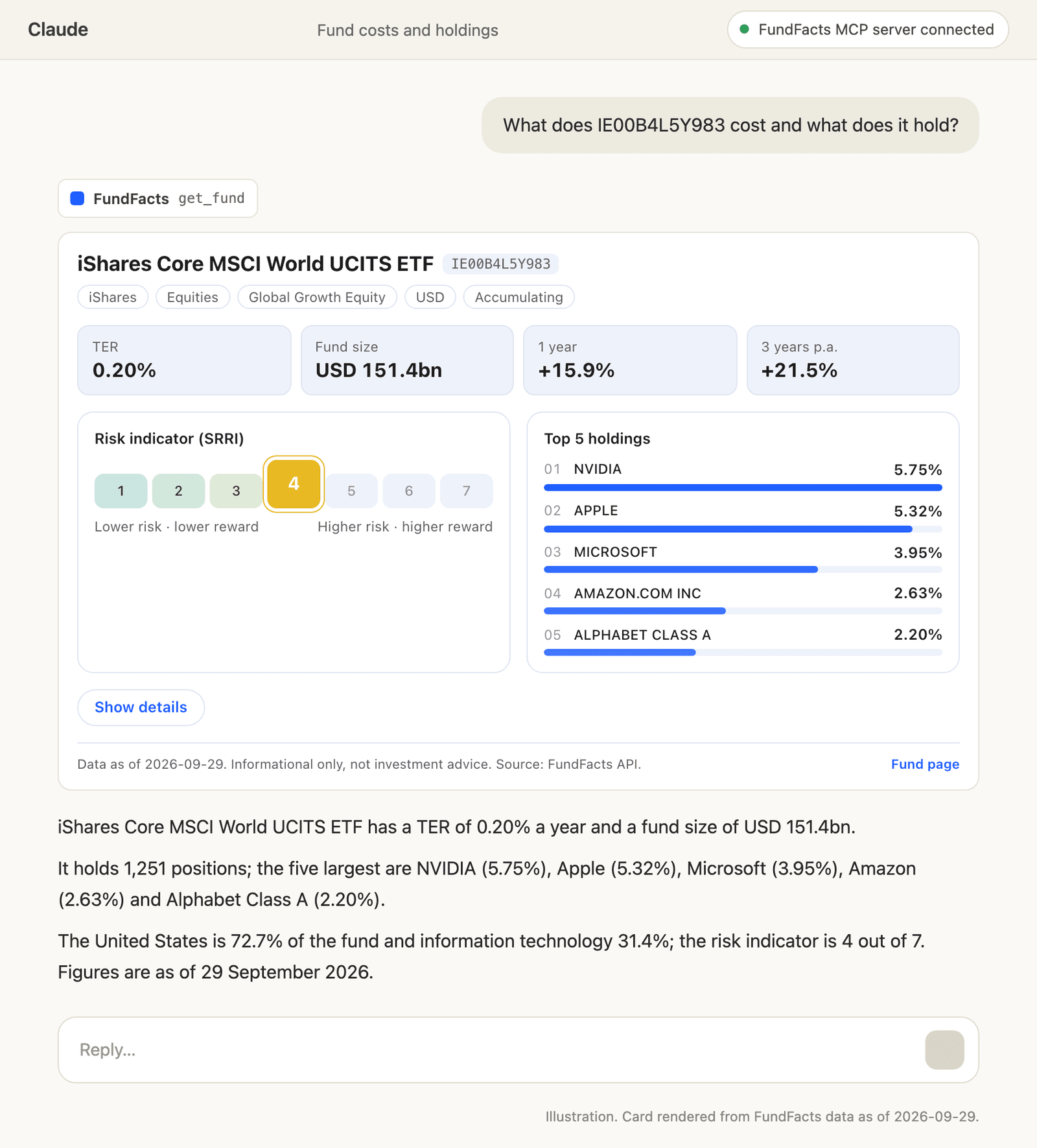 Illustration: a fund card for IE00B4L5Y983 in Claude.
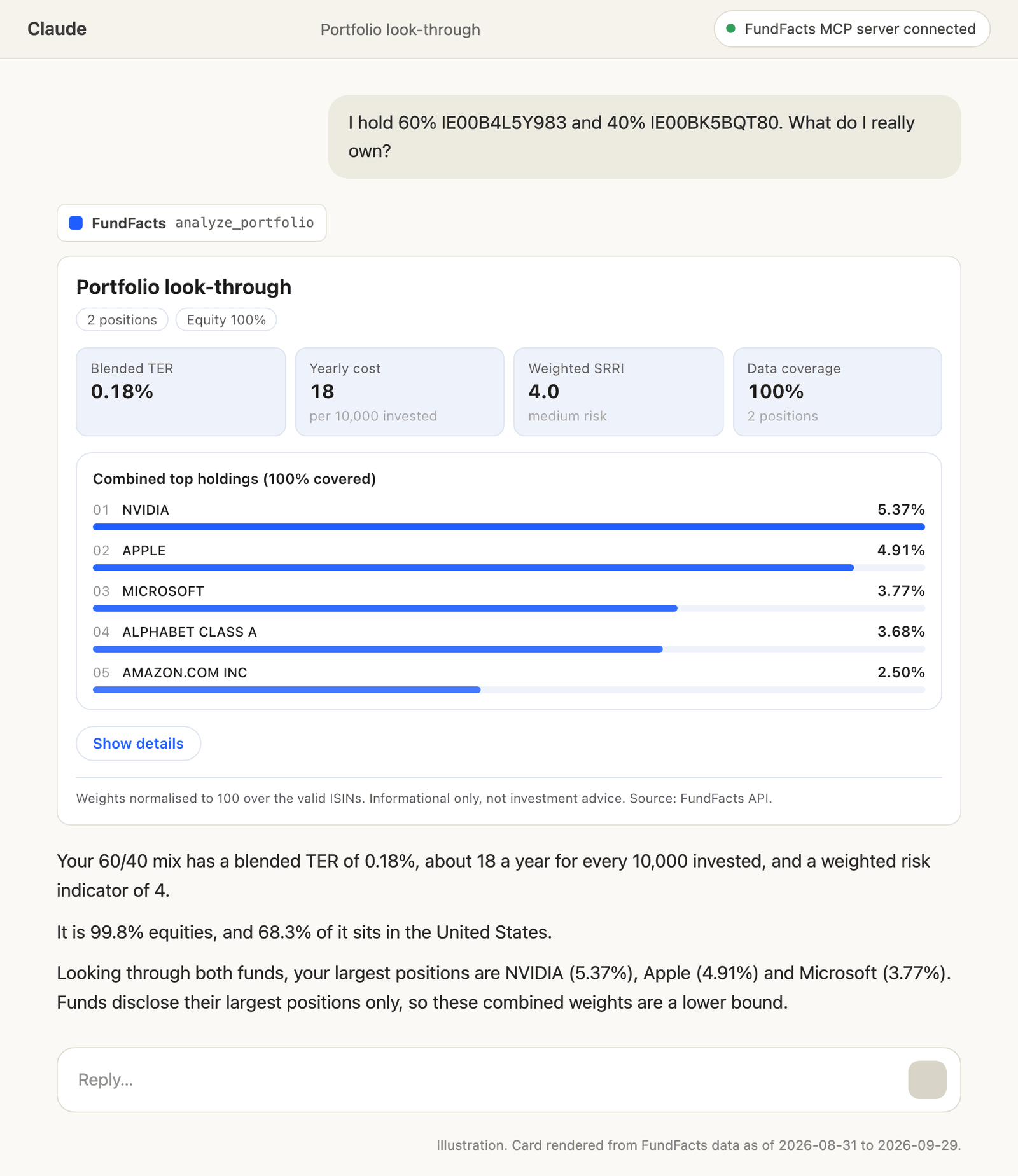 Illustration: a portfolio look-through card in Claude.
| Tool | Card |
|---|---|
get_fund | Fund card |
search_funds | Text only |
compare_funds | Comparison card |
analyze_portfolio | Look-through card |
fund_overlap | Overlap card |
get_scpi | SCPI card |
search_scpi | Text only |
Setup: Claude on the web, desktop and Cowork
1. Open Customize → Connectors → Add custom connector. On Team and Enterprise, an Owner adds it under Organization settings → Connectors; the Free Claude plan allows one custom connector.
2. Name: FundFacts. Remote MCP server URL: https://fundfactsapi.com/api/mcp. Leave the advanced OAuth client ID and secret empty; the app registers itself.
3. Click Connect, sign in with your FundFacts account on the consent screen and approve.
4. In a conversation, make sure FundFacts is enabled in the tools menu, then ask about a fund.
The connector follows your Claude account, so it is also available in Claude Desktop and Cowork.
Setup: ChatGPT
Remote MCP servers are added in developer mode, on Plus, Pro, Business, Enterprise and Edu, on the web.
1. Settings → Security and login → turn Developer mode on.
2. Open Plugins (chatgpt.com/plugins) and click +.
3. Name: FundFacts. URL: https://fundfactsapi.com/api/mcp. Authentication: OAuth.
4. Click Create, sign in with your FundFacts account and approve.
ChatGPT cannot send an API key, so it always signs in with the account.
Setup: Claude Code
Then run /mcp in a Claude Code session, pick fundfacts and sign in with your FundFacts account. To use an API key instead of the sign-in:
Or install the FundFacts plugin, which adds the server and four skills that tell Claude Code how to read and present the fund data (public repository: github.com/fundfactsapi/fundfacts-plugin), then /mcp to sign in:
Setup: Cursor
Create or extend .cursor/mcp.json (or ~/.cursor/mcp.json for every project), then enable the tools in Cursor's MCP settings:
.cursor/mcp.json — json
Setup: VS Code (GitHub Copilot agent mode)
Save as .vscode/mcp.json; VS Code asks for the key once and keeps it out of the file:
.vscode/mcp.json — json
Setup: Windsurf
Add the server to ~/.codeium/windsurf/mcp_config.json; Windsurf names the URL key serverUrl:
mcp_config.json — json
Setup: Codex
Codex reads MCP servers from ~/.codex/config.toml; export FUNDFACTS_API_KEY=ffk_… in the shell that starts it:
~/.codex/config.toml — toml
Setup: any other MCP client
Clients that support remote servers take the URL and a header, usually in this shape:
json
Clients that only speak stdio (including claude_desktop_config.json) go through the mcp-remote bridge:
json
Authentication
Sign in with your FundFacts account (OAuth). ChatGPT, claude.ai, Claude Desktop, Cowork, and Claude Code through /mcp. A consent screen opens in the browser; the app gets an access token (OAuth 2.1 with PKCE) and no API key leaves your dashboard. The token only works on the MCP server, never on the REST API.
An API key as a header. Claude Code, Cursor, VS Code, Windsurf, Codex and scripts send Authorization: Bearer ffk_…, the same key as the REST API (Authentication). Create a dedicated key per tool so you can revoke one without touching the others.
Limits and billing
The MCP server works on every FundFacts plan, Free included, with the same monthly allowance and per-minute limit as the API keys of the account.
Each fund found counts as one request, like the REST API (misses are free): get_fund costs 1, compare_funds and fund_overlap 1 per ISIN, analyze_portfolio 1 per position, get_scpi 1.
search_funds, search_scpi and get_fund on the example fund IE00B4L5Y983 are not counted; an ISIN still loading is not counted either.
compare_funds, fund_overlap and analyze_portfolio take at most the plan's batch size per call: 1 ISIN on Free, 10 on Starter, 50 on Pro, 200 on Scale, 1,000 on Enterprise. On Free, comparing several funds therefore needs Starter or above.
Portfolio look-through and holdings overlap are not included in every plan. Requests & rate limits and Pricing list which plans include them and each plan's allowance.
Privacy and disconnecting
Every app signed in with your account is listed in the AI tab of the dashboard under Connected apps, with its name, last use and requests this month. Disconnect cuts it off at once; the app has to sign in again to reconnect.
Each call is logged with the connection, the endpoint, the ISIN or SCPI identifier, the cache status, the status and the duration; search terms and portfolio weights are not stored in that log (what we collect).
The FundFacts team gets a notification on the first tool call of the day per connected app or API key (your e-mail address and plan, the app, the tool and the first ISIN or SCPI, never search text) and a daily usage summary (how we use it).
The AI app (OpenAI for ChatGPT, Anthropic for Claude) receives the tool results and, if you approve it on the consent screen, your account id and e-mail address, and processes your conversation under its own policy (who receives it).
The data is informational, not investment advice.
Troubleshooting
The sign-in keeps coming back (sign-in loop)
The consent screen needs you signed in to https://fundfactsapi.com in the same browser. Sign in at https://fundfactsapi.com/login, then click Connect again in the app. If it still loops, remove the connector, add it again with the exact URL https://fundfactsapi.com/api/mcp (no trailing slash, no query string) and leave the OAuth client ID and secret empty: the app registers itself.
401 Unauthorized
With an API key, the header must read exactly Authorization: Bearer ffk_… and the key must still be active in the dashboard (a revoked key answers 401 at once). An app you disconnected in the dashboard loses its tokens: connect it again. OAuth tokens only work on the MCP server, so the same token sent to the REST API answers 401 by design.
"Being loaded for the first time; ask again in a minute"
A fund nobody asked for in the last 24 hours is read from its issuer's documents on demand, which typically takes 15–90 seconds, up to a few minutes. When that outlasts the tool call, get_fund says so; ask again a minute later and the answer comes from the store. An ISIN still loading is not counted.
"Not included in this account's plan"
analyze_portfolio and fund_overlap are not included in every plan; the other five tools work on every plan, Free included. Requests & rate limits (/docs/requests) and Pricing (/pricing) list which plans include the look-through and overlap.
"This account's plan allows N ISINs per call"
compare_funds, fund_overlap and analyze_portfolio take at most the plan's batch size per call: 1 ISIN on Free, 10 on Starter, 50 on Pro, 200 on Scale, 1,000 on Enterprise. On Free, comparing several funds therefore needs Starter or above. Split the list, or see Requests & rate limits (/docs/requests).
"Monthly requests are used up" or "per-minute limit reached"
The connection shares the account's monthly allowance and per-minute burst limit with its API keys. The message gives the reset date; searches and the example fund keep working meanwhile. Usage per connection is in the dashboard.
No card in Claude Code
Expected: Claude Code is a terminal, so it shows the tool result as text, with the same figures. Cards render in ChatGPT and in Claude on the web and desktop.
The tools do not show up
Check that the connector is enabled for the conversation in the app's tools menu. In Claude Code, /mcp lists the server and its status; in Cursor, VS Code and Windsurf, the MCP settings show whether the server started and how many tools it lists (seven).
FAQ
Does it cost extra?
No. The MCP server works on every FundFacts plan, Free included, and each fund found counts as one request, exactly like the REST API. Misses, searches and the example fund are not counted.
Is FundFacts in the Claude or ChatGPT app directory?
Not today. Add it yourself as a custom connector with the URL https://fundfactsapi.com/api/mcp; it takes about a minute with the steps on this page.
Can the assistant change anything in my account or place an order?
No. All seven tools only read fund and SCPI data; none of them touches your account, your keys or your billing, and they are declared read-only to the app.
Is it investment advice?
No. FundFacts returns the figures the fund houses publish, with their date. The data is informational, not investment advice, and the server tells the assistant not to recommend buying or selling.
Can I use an API key in claude.ai or ChatGPT?
No: their connector screens have no header field, so they sign in with your FundFacts account (OAuth). API keys are for Claude Code, Cursor, VS Code, Windsurf, Codex and scripts.
Does it work with other MCP clients?
Yes. Any client that supports remote MCP servers over Streamable HTTP connects with the URL and a bearer header; clients that only speak stdio go through the mcp-remote bridge.
Also see AI agents & MCP for llms.txt, the OpenAPI spec and the AI companion kit for coding agents.